How to Make Money on Pinterest: 6 Ways That Work (With Real Numbers)
 Paul
Read in: English Español Français Deutsch
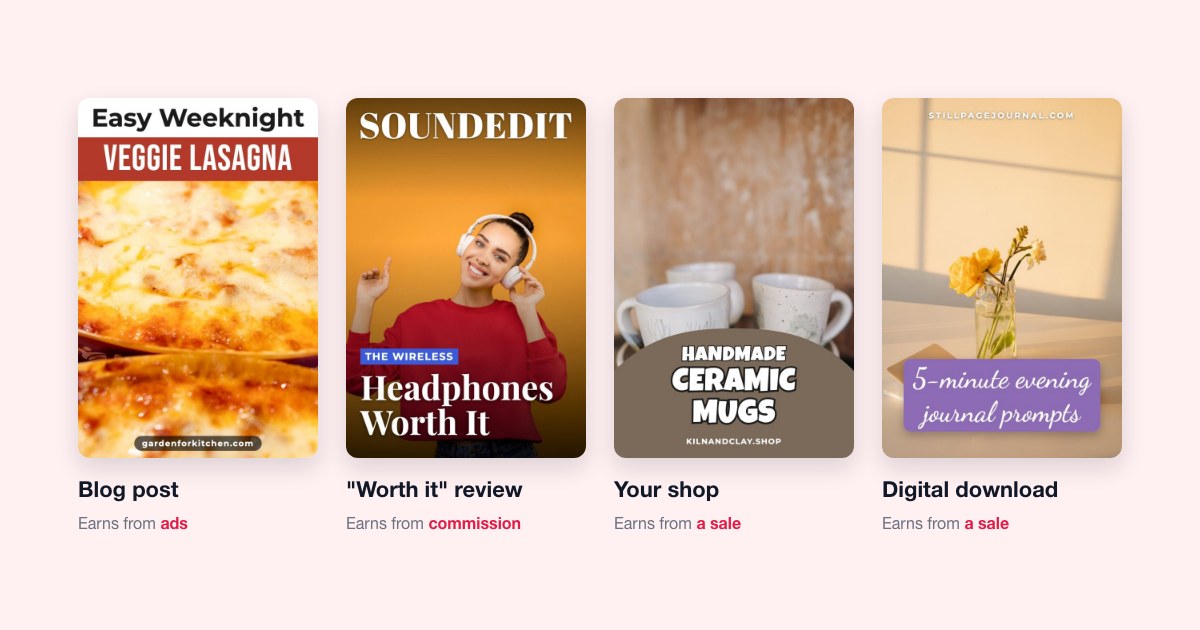
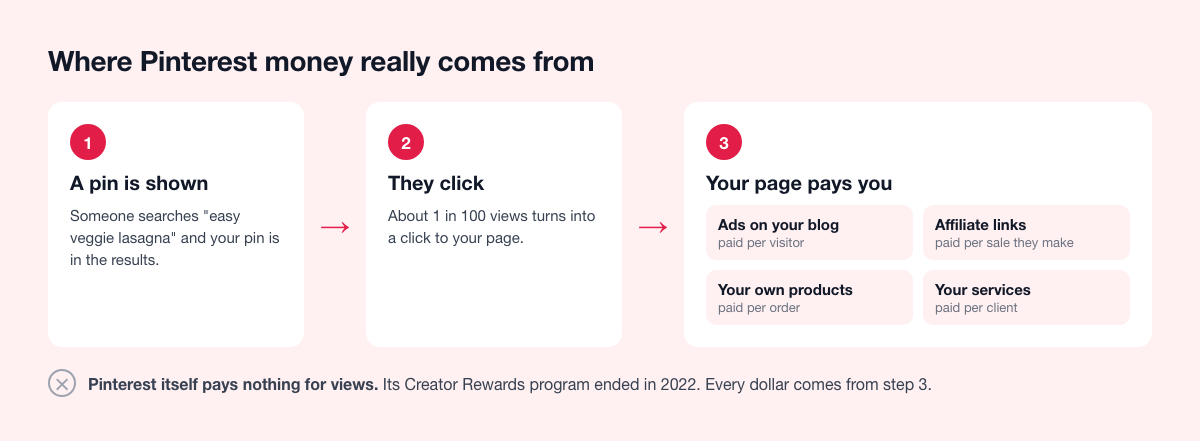
Yes, you can make money on Pinterest. But not the way most people expect. Pinterest doesn't pay you for views, followers or saves. It sends people to a page, and the page is where the money is made: ads on a blog post, a commission on a product you recommend, an order in your shop.
So the real question is: what page will your pins send people to, and how does that page earn? This guide answers that for the six ways that work today, with numbers from our own data: about 3,700 top pins from 46 Pinterest accounts, February to October 2026. They are each account's top pins, so the sample favors winners, but the patterns between them hold.
The short answer
- Pinterest pays nothing for views. Its Creator Rewards program ended in November 2022.
- You earn from the click. In our data, pins that link to a blog post or site page get clicked 1.2% of the time they're shown. That's about 12 visits for every 1,000 views.
- Six ways turn those visits into money: blog ads, affiliate links, your own products, digital downloads, brand deals and managing Pinterest for others.
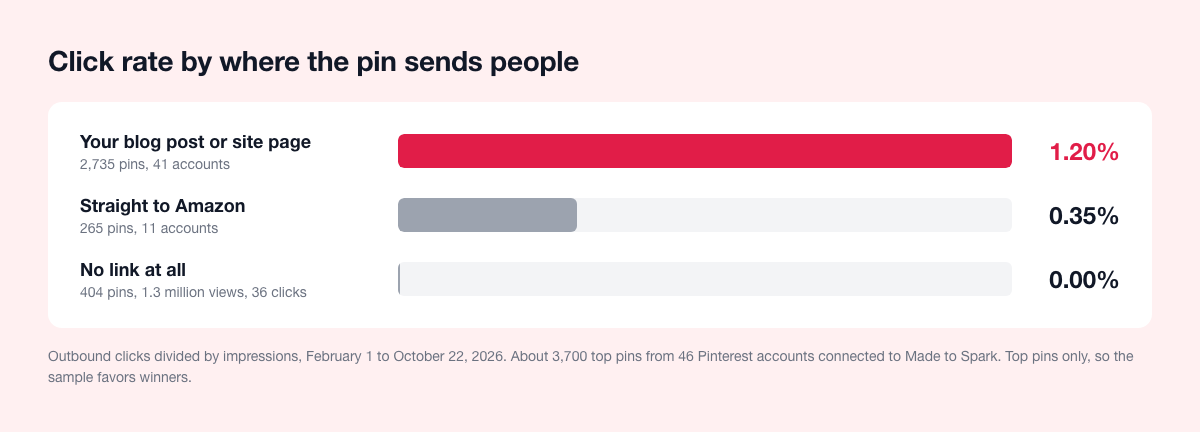
- Send pins to your own page first. Pins to a blog post or site page got clicked more than three times as often as pins straight to Amazon.
Do this now (15 minutes)
- Open Pinterest Analytics and write down two numbers for the last 30 days: impressions and outbound clicks. If you don't have a business account yet, switch to a business account first, or Pinterest shows you no numbers at all. What impressions and views mean explains each number.
- List the pages your pins could send people to: blog posts, product listings, a sales page. Next to each, write how it earns: ads, a commission, a sale, or nothing yet.
- Circle the three pages that earn and already get some visits. Those are your first pins. A page that earns nothing will earn nothing from Pinterest either.
The 6 ways, side by side
| Way | You need | You're paid | Best for |
|---|---|---|---|
| 1. Blog posts with ads | A blog with steady posts | Per 1,000 visits | Food, home, travel, parenting, DIY bloggers |
| 2. Affiliate links | A page with your picks, an affiliate account | A share of each sale | Reviewers, gift guides, "what I use" posts |
| 3. Your own products | An Etsy, Shopify or other shop | Per order | Makers and shop owners |
| 4. Digital downloads | A printable, template or course | Per sale, again and again | Planners, teachers, designers |
| 5. Brand deals | An audience in one clear niche | Per campaign | Creators with a steady following |
| 6. Pinterest management | Time and a few results to show | A monthly fee per client | Virtual assistants, marketers |
Way 1: Pin your blog posts and earn from ads
This is the classic route for bloggers. Every post gets several pins, the pins send readers to the post, and an ad network pays you for the visits. Pinterest for bloggers shows the pin designs that fit each kind of post.
What you need: a blog, and an ad network that will take you. Ad networks set traffic minimums. Raptive asks for 25,000 monthly pageviews, with at least half from the US, UK, Canada, Australia or New Zealand. Mediavine's Journey program takes smaller sites, from around 1,000 monthly sessions; check its current rules before you apply. Until then, Google AdSense works on almost any site but pays less.
How to start:
- Pick posts people search for on Pinterest: recipes, room ideas, travel itineraries, how-tos. Check each topic with the Pinterest keyword tool before you pin it.
- Make 3 to 5 different pins per post, each with a different photo or headline. Turn one blog post into a month of pins shows how.
- Pin your old posts too. Six in ten clicks in our data came from pins made in earlier years, so an archive is worth pinning. Pin your archive shows how.
- Put an affiliate link or a newsletter sign-up in the post as well, so one visit can earn twice.
Tip: ads pay by the page view, so a reader who clicks to a second post doubles what the visit is worth. Link each post to two or three related ones near the top.
Mistake to avoid: pinning only your newest post. A new post has no proof yet. Your top 20 posts by Google traffic are a better start, because people already want them.
Way 2: Affiliate links, through your own page
You recommend a product, link to it with your affiliate link, and earn a share when someone buys. Pinterest affiliate marketing, step by step covers the setup, and the best affiliate programs for Pinterest compares what each one pays. Pinterest allows affiliate links, as long as you say plainly that the link earns you money.
Where the pin points matters a lot. In our data, pins straight to Amazon got clicked 0.35% of the time. Pins to a blog post or site page got 1.20%. A pin of a product photo with a link to the product looks like an ad. A pin with a useful headline ("7 Wireless Headphones Worth It Under $100") looks like an answer, and people click answers.
How to start:
- Write one short page per idea: a review, a gift guide, a "what's in my kit" list. Five to ten products, each with a sentence on why.
- Add your affiliate links inside the page, with a clear note at the top such as "This post has affiliate links; I earn a commission if you buy." Amazon also asks for its own line on your site: "As an Amazon Associate I earn from qualifying purchases."
- Make 3 to 5 pins for the page, each one built around a search: "gifts for new dads", "best carry-on backpack".
- Pin gift guides 60 to 90 days before the holiday they're for. People plan early on Pinterest.
Amazon in particular: Amazon decides where its links may appear, and Pinterest isn't on the list of social networks it accepts for an Associates application. The safe route is the one above: pin your own page, and put the Amazon links there. Pinterest for Amazon affiliates covers the rules in detail. Programs built for creators, such as LTK and ShopMy, have their own rules on linking from Pinterest.
Mistake to avoid: link shorteners and redirect pages. Pinterest treats hidden destinations as spam, and a blocked domain takes every pin down with it.
Way 3: Sell your own products
If you already sell something people would save, such as mugs, prints, jewelry or home decor, Pinterest is a shop window that keeps working for years. A pin of a product people search for can bring orders long after you post it.
How to start:
- Start with your 10 best sellers. They already convert.
- Make 3 to 5 pins per product: the product alone, the product in use, a close-up, and one with the searched phrase on it ("Handmade Ceramic Mugs").
- Link each pin to the product page itself. Every extra click loses buyers.
- Turn on Rich Pins so the price and stock show on the pin. The Rich Pins validator checks a product page in a few seconds.
- Pin before the season: Christmas gifts in September, Mother's Day in February.
Shop guides: Pinterest for Etsy and the 30-day plan for Etsy sellers, or Pinterest for Shopify. How to sell on Pinterest covers catalogs and product Rich Pins step by step.
Tip: most Etsy sellers pin the listing photo as it is. In a study of 156 Etsy seller pins, 76% had no text at all. A pin with the product name or the gift idea written on it gives people a reason to stop scrolling.
Way 4: Sell digital downloads
Printables, planners, Canva templates, lesson plans, presets, ebooks: Pinterest users search for exactly these. You make the product once and sell it again and again, so each click is worth more over time.
How to start:
- Show the result. A planner pin shows a filled-in page on a desk; a template pin shows the finished design. Making pins in Canva covers the design steps.
- Name the use in big words: "Weekly Meal Planner Printable", "Canva Templates for Etsy Sellers".
- Link to the product's own sales page on Etsy, Gumroad, Payhip or your site.
- Make a separate pin for each version or bundle.
More: Pinterest for digital products, for Gumroad, for Payhip, for Teachers Pay Teachers, and how to sell Canva templates on Pinterest.
What 196 digital-product pins show
We looked at 196 real pins for digital products: printables, planners, templates and the like. Three looks made up most of them: a device mockup, with the product shown on a screen (26%); a grid of pages (26%); and a plain cover or screenshot (21%). None showed a price, and only 1.5% were video.
The surprise was in the saves. Device mockups were about one pin in four, yet of the 34 pins with 50 or more saves, only 2 were mockups. One likely reason: a page shrunk onto a laptop screen is hard to read, while a planner page or worksheet shown up close lets people see what they'll get. That's step 1 above: show the result.
Our Etsy research points the same way on words. In 156 Etsy pins, 76% carried no text at all, but digital planners were the exception: 13 of 17 were text-heavy covers. So for downloads, put the product's name and use in large words on the pin, and leave the price for the sales page, as every pin in the sample did.
Way 5: Brand deals
Brands pay creators to make pins about their products. Pinterest has a paid partnership tool for this: you tag the brand on the pin, and the pin shows a "Paid partnership" label. The deal itself is made between you and the brand, outside Pinterest, and the brand needs its own Pinterest account.
How to start: pick one niche and stick to it, so a brand can see who your pins reach. Build a one-page media kit with your monthly views, top pins and outbound clicks. Then pitch brands you already use and pin about. Small brands answer more often than big ones.
Be realistic: brand deals come once you have an audience. Treat them as a later step on top of ways 1 to 4.
Way 6: Manage Pinterest for others
Many bloggers and shop owners know Pinterest works but have no time for it. A Pinterest manager (often a virtual assistant) makes and schedules their pins for a monthly fee. You don't need your own audience, just results you can show.
How to start:
- Grow your own account, or a friend's, for 60 days. That's your case study: views and clicks before and after.
- Offer one clear package: a set number of new pins a month, boards set up, a monthly report.
- Find clients where they already ask for help: blogging groups, Etsy seller forums, local businesses with a website.
- Use tools that make pins in bulk and schedule them, so one client takes only hours a month. Pinterest for virtual assistants shows how to run each client in its own workspace.
Which way to start with
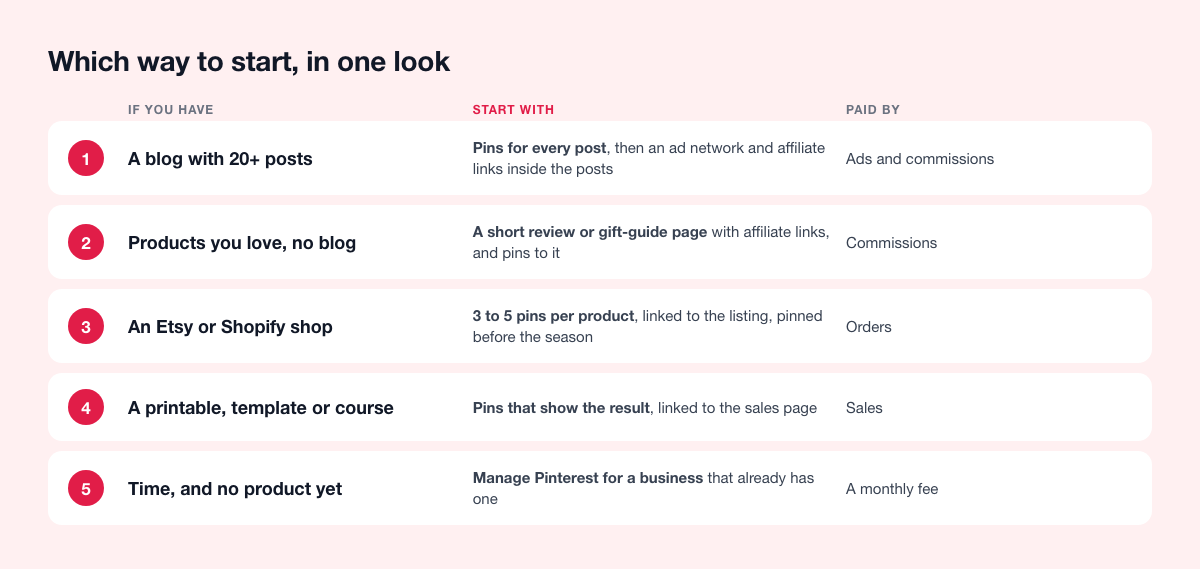
Don't try all six. Pick the one that fits what you already have, and add a second only when the first earns.
How much can you make on Pinterest?
It depends on two numbers you control and one you don't. You control how many pins you make and what page they point to. You don't control how many people search for your topic.
In round numbers, say your pins are seen 50,000 times a month:
| Step | Number | Where it comes from |
|---|---|---|
| Pin views a month | 50,000 | Your Pinterest Analytics |
| Click rate | 1.2% | Pins to a blog post or site page, in our data |
| Visits to your pages | 600 | 50,000 × 1.2% |
| What a visit is worth | Depends on the page | Ads pay per 1,000 visits; affiliate links and products pay per sale |
Put your own numbers into the calculator above. Two things move the result most: more views (more pins, on more pages) and a page that earns more per visit (a buying guide beats a general post).
Most people earn little in the first months. Pins take weeks to be shown widely, and the pins that bring the most clicks are often a year old. People who earn well from Pinterest have usually pinned steadily for a long time.
Your first 30 days
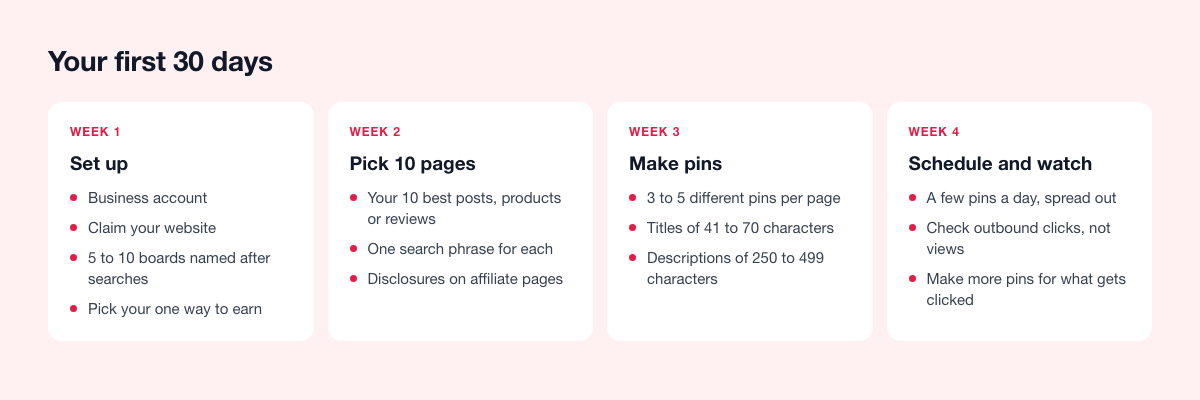
- Week 1, set up. Switch to a business account, claim your website, and make 5 to 10 boards named after what people search ("Easy Weeknight Dinners", not "Yum"). The board name generator suggests names that match searches, and Pinterest board ideas has examples.
- Week 2, pick 10 pages. Your 10 best posts, products or reviews. Give each one search phrase from the keyword tool. Add affiliate disclosures where needed.
- Week 3, make pins. 3 to 5 different pins per page; how to make pins that get clicks covers the design. Use 1000 × 1500 pixels. Put the search phrase in big letters on the pin and in the title.
- Week 4, schedule and watch. A few pins a day, spread over the month, beats 40 on one Sunday, and the best time to post on Pinterest shows why the exact hour matters little. How often to post covers the pace. After two weeks, look at outbound clicks, not views, and make more pins for the pages that get clicked.
10 tips that turn views into money
- Make several pins per page. Posts with two or more different top pins were 27% of posts in our data but brought 74% of the clicks.
- Write titles of 41 to 70 characters. They were seen most: a median of 120 views, against 46 for pins with no title.
- Write real descriptions. Descriptions of 250 to 499 characters had a 1.35% click rate. Under 100 characters: 0.28%. How to write pin titles and descriptions has a formula.
- Skip the hashtag pile. Pins with ten or more hashtags had a median of 14 views. Pins with none had 154. Use keywords in sentences instead; our Pinterest SEO guide shows where they go.
- Always add a link. 404 top pins in our data had no link. They were seen 1.3 million times and sent 36 clicks. Check your old pins.
- Link to the exact page. The recipe, not the recipe index. The product, not the shop.
- Pin the season early. 60 to 90 days ahead. The seasonality planner shows when your topic starts climbing, and how to use Pinterest trends shows what's rising.
- Keep old pages alive. A fresh pin for an old post counts as new content. Six in ten clicks in our data came from pins made in earlier years.
- Use the searched words on the image. People decide from the thumbnail. If the phrase they searched is on the pin, they stop.
- Judge by outbound clicks. Views feel good but don't pay. A pin with fewer views and more clicks is the one to copy.
The numbers behind these tips, with the method, are on Pinterest pin data 2026.
Mistakes that cost money
- Waiting for Pinterest to pay you. It won't. Build the page that earns first.
- Buying followers. Followers aren't who sees your pins; searchers are. How to get Pinterest followers covers what grows an account. Bought followers don't click, and buying them breaks Pinterest's rules.
- Hiding affiliate links. Shorteners and redirects look like spam to Pinterest. Use the real link and a clear disclosure.
- Posting the same image again and again. Repins of one image to many boards can get an account flagged. Make new images instead. What's safe to automate covers the limits.
- Giving up after a month. Pins grow slowly. Judge a pin after three months.
Questions people ask
Does Pinterest pay you for views?
No. Pinterest ended its Creator Rewards program in November 2022 and doesn't pay creators per view or per follower. You earn from what happens after the click: ads on your blog, affiliate commissions, product sales, brand deals or client fees.
How much does Pinterest pay for 1 million views?
Pinterest pays nothing for the views themselves. A million views at a 1.2% click rate is about 12,000 visits to your pages. What those visits earn depends on the page: ad income per 1,000 visits, or the commission and sales from the people who buy.
Can you make money on Pinterest without a blog?
Yes. You can link pins to your Etsy or Shopify products, to a digital product on Gumroad or Payhip, or manage Pinterest for other businesses. For affiliate links, a simple one-page site with your picks works better than linking straight to a store.
Can you make money on Pinterest without showing your face?
Yes. Most pins that earn show a product, a recipe, a room or a printable, not a person. Affiliate pages, digital products and shop pins all work as faceless Pinterest income. How to build a faceless Pinterest account covers the setup step by step.
How many followers do you need to make money on Pinterest?
None. Most views on Pinterest come from search and the home feed. A new account with good pins on searched topics can get clicks from its first weeks.
Are affiliate links allowed on Pinterest?
Yes, if you disclose them clearly and use the real link, with no shortener or redirect. Each affiliate program also has its own rules on where its links may appear. Amazon's, for example, don't list Pinterest among accepted social networks, so pin your own page with the links on it.
How long does it take to make money on Pinterest?
Expect a few months before steady clicks. New pins take weeks to be shown widely, and the pins that earn most are often months or years old. A shop with products that already sell can see orders sooner.
Do you need a Pinterest business account?
Yes, for anyone earning money from Pinterest. It costs nothing, gives you analytics, and lets you claim your website and turn on Rich Pins. How to set up Rich Pins walks through the last step.
The checklist
- Pick one way to earn that fits what you already have.
- Switch to a business account and claim your website.
- Choose your 10 best pages that earn.
- Make 3 to 5 different pins for each, with the searched phrase on the image.
- Titles of 41 to 70 characters, descriptions of 250 to 499.
- Link every pin to the exact page, never through a shortener.
- Disclose affiliate links on the pin and on the page.
- Pin seasonal pages 60 to 90 days ahead.
- Judge pins by outbound clicks after three months.