Best Pinterest Scheduler for Bloggers in 2026
 Paul
Read in: English Español Français Deutsch

For most bloggers, the best Pinterest scheduler is the one that also solves the harder problem: having enough fresh pins to schedule. If you already make plenty of pins, Pinterest's own scheduler (plus its RSS auto-publish for new posts) or Tailwind will post them. If you don't, a tool that makes pins from your posts and schedules them, like Made to Spark, BlogToPin or Pin Generator, saves more time than any calendar.
We make one of these tools, Made to Spark. Facts about the others come from their own pricing and help pages, last checked on October 22, 2026.
Do this now (10 minutes)
- Count the pins you posted last week. If it's under five, scheduling isn't your bottleneck; making pins is.
- Count how many networks you post to. Pinterest alone, or five, changes which tool fits.
- Check your Pinterest account is a business account with your website claimed. Pinterest's own scheduler and RSS auto-publish need both.
- Work out your monthly number: pins a day × 30. Hold every tool below up against it.
How we compared them
We read each scheduler's own pricing and help pages and worked out the same thing for each: what it takes to post 150 pins a month (five a day), whether it makes pins or only posts them, and whether it re-shares older posts. We also used our own numbers from about 3,700 top pins across 46 accounts (February to October 2026; the sample favors winners).
Two findings matter for choosing a scheduler:
- The day you post barely matters. Top pins first posted on each day of the week ended up with similar typical views: a median between 75 and 111 for every day. "Best time to pin" features are a nice extra and shouldn't decide which tool you pick.
- Old pins keep working. About six in ten clicks in 2026 came from pins made in earlier years. A scheduler that helps you keep a steady flow of fresh pins for older posts is worth more than precise timing. Full tables and method: Pinterest pin data 2026.
The schedulers
Pinterest's own scheduler and RSS auto-publish
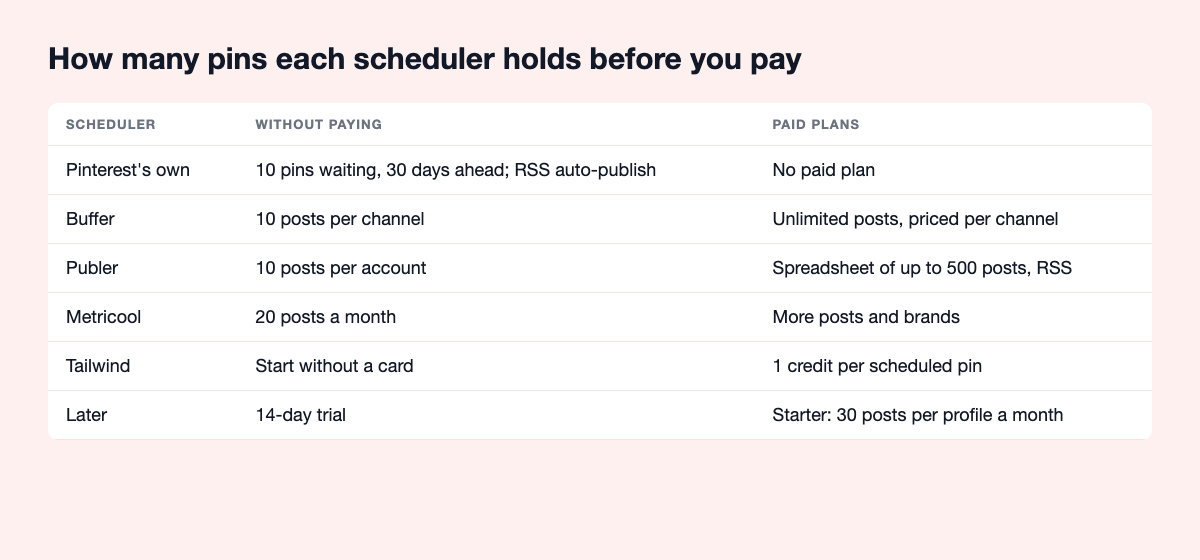
On business accounts, the pin builder holds up to 10 pins waiting, up to 30 days ahead, added one at a time; you can't change the image after scheduling. Bulk create on desktop takes up to 200 pins at once, each with its own publish date. And with a claimed website, RSS auto-publish turns each new blog post into a pin within about a day.
Best for: bloggers posting up to two pins a day (10 waiting pins is about five days' worth). Watch out: the 10-pin queue means topping it up twice a week.
Tailwind
The long-standing Pinterest scheduler, which calls itself Pinterest's longest-standing developer partner, since 2012. SmartSchedule picks posting times, SmartPin turns a link or your RSS feed into a fresh pin every week, and Create and Ghostwriter help make pins. You can start without a card.
Best for: bloggers who make their own pins and want Pinterest-specific tools. Watch out: scheduling a pin uses one credit, and SmartPin and keyword searches use credits too. 150 pins a month is half the 300 credits on its Pin Scheduling & Creation plan. Made to Spark vs Tailwind.
Buffer, Later, Publer and Metricool
Multi-network schedulers, with Pinterest as one channel next to Instagram, Facebook and the rest.
- Buffer: start with 10 scheduled posts per channel; paid plans have no post limit and are priced per channel.
- Publer: start with 10 scheduled posts per account (a Pinterest account needs 100 followers or a claimed website). The 500-post spreadsheet upload and RSS are on paid plans.
- Metricool: start with 20 posts a month.
- Later: 14-day trial; its Starter plan allows 30 posts per profile a month, about one pin a day.
Best for: bloggers who post to several networks. Comparisons: Publer, Metricool.
Hootsuite, Sprout Social, SocialBee, Vista Social and Planoly
Built for teams and agencies, or for visual planning. SocialBee can recycle older posts and pull from RSS; Planoly posts to Pinterest where it can and otherwise sends reminders. Most offer a 14-day trial. More than a solo blogger needs.
Made to Spark
Ours. It makes the pins and schedules them. Paste a post, or connect your blog and tick the posts you want, and get pins from each post's photos with title, description, alt text and board. On Solo and Growth, approve a batch and it's spread over 30 days through Pinterest's official API. Auto Pin, also on Solo and Growth, drafts pins for new and older posts in rotation; approve them on a review day, or let it run automatically. With Posts you pick, the posts you choose get a brand-new pin every week, with no credits. Scheduling is included in every plan, with no charge per pin (Lite posts up to 5 pins a day). It also works inside ChatGPT and Claude: make and schedule pins by chatting. See the scheduler and pricing.
Best for: bloggers short of fresh pins. Doesn't do: Instagram, TikTok or video pins.
BlogToPin and Pin Generator
Also make and schedule. BlogToPin caps pins per day by plan. Pin Generator charges one credit per scheduled pin and five for a video pin. Run the same posts through two of these and compare the pins.
What users say
From public reviews on Trustpilot and G2 and a Reddit test of four schedulers, read in October 2026.
- Tailwind: "deepest Pinterest-specific features by a wide margin" in a Reddit four-tool test; the most repeated complaints on Trustpilot (3.0 from about 300 reviews) are renewals charged without warning and slow support.
- Buffer: 4.1 on Trustpilot; praised as simple and cheap, and the same Reddit test says Pinterest scheduling works but Pinterest analytics are close to nonexistent.
- Later: well rated on G2 and Capterra, but 1.4 from about 350 reviews on Trustpilot, mostly about renewals and support; the Reddit test calls Pinterest "an afterthought" there.
- Publer: 4.9 from about 1,000 Trustpilot reviews for ease and value; its own docs say Idea Pins aren't supported and a spreadsheet upload can't set a board per pin.
- Metricool: 4.1 on Trustpilot, praised for fast support; some G2 reviews mention renewals and accounts disconnecting. A Pinterest Community user picked it over Tailwind because it supports alt text.
- Made to Spark, BlogToPin and Pin Generator: too few independent reviews as schedulers to sum up.
What 150 pins a month takes
| Scheduler | Makes pins | 150 pins a month | Re-shares older posts |
|---|---|---|---|
| Pinterest's own | No | Yes, topping up the 10-pin queue, or bulk upload | No |
| Tailwind | Create, Ghostwriter | 150 of 300 credits on Pin Scheduling & Creation | SmartPin |
| Buffer | No | Paid plan, per channel | No |
| Later | No | Over the Starter cap of 30 | No |
| Publer | No | Paid plan, per account | Paid plans |
| Metricool | No | Over the 20 starting posts | Not stated |
| Made to Spark | Yes, from your posts | Included in every plan (Lite: up to 5 pins a day) | Auto Pin rotation |
| BlogToPin | Yes | Within the daily cap | Not stated |
| Pin Generator | Yes, credits | 150 credits | Yes |
Checked on each tool's own pages in October 2026. Features change; check before you decide.
What to schedule: several pins per post, spaced out
In the same 3,700 top pins, what went with clicks wasn't the posting time but how many different pins a post had. Posts with one top pin had a median of 0 outbound clicks. Two different pins: 4. Three: 7. Four: 10.5. Five or more: 16.5. Posts with two or more different pins were 27% of the posts and brought 74% of the clicks. Popular posts get pinned more, so read it as a pattern, not proof.
That changes what 150 pins a month should mean: not 150 posts pinned once, but about 40 posts with three or four different pins each, spaced so the same post doesn't show up day after day. With a calendar-only scheduler, that spacing is up to you. Made to Spark keeps pins for the same page a week apart while different pages go out daily; even its smallest plan, Lite, posts up to 5 pins a day, which is 150 a month.
The trade-off: three or four designs per post is the slow part. If you like making them in Canva, a scheduler that costs nothing is fine and your time goes into design. If you'd rather not, that's where a tool that makes the pins earns its price.
How to choose
- You make pins in Canva, up to two a day: Pinterest's own scheduler, plus RSS auto-publish for new posts. Nothing to pay.
- You make lots of pins and want Pinterest-only tools: Tailwind, after checking the credit math.
- Pinterest is one of several networks: Buffer, Publer, Later or Metricool.
- You don't have enough pins to schedule: a tool that makes them from your posts. Pinterest automation: what's safe covers what to look for.
Questions people ask
What is the best Pinterest scheduler for bloggers?
If you already make plenty of pins, Pinterest's own scheduler with RSS auto-publish, or Tailwind. If you don't, a tool that makes pins from your blog posts and schedules them, such as Made to Spark, BlogToPin or Pin Generator, because making the pins is the slow part.
Is Pinterest's own scheduler enough?
For up to two pins a day, yes. It holds 10 pins up to 30 days ahead on business accounts, and bulk create takes up to 200 at once on desktop.
Is Tailwind worth it for bloggers?
It's solid and Pinterest-focused. Count the credits first: one per scheduled pin, so 150 pins a month uses half of the 300 credits on its scheduling plan.
Does the time or day I post matter?
Less than most tools suggest. In about 3,700 top pins we looked at, pins first posted on any day of the week ended up with similar typical views. Posting steadily matters more.
Are Pinterest schedulers safe to use?
Yes, if they post through Pinterest's official login. Avoid anything that asks for your Pinterest password or posts the same image over and over.
The checklist
- Count last week's pins: is the problem making or posting?
- Business account, website claimed, RSS auto-publish on.
- Work out your monthly pin number and test each tool against it.
- Official Pinterest login only.
- A few pins every day, any day.