Best Pinterest Automation Tools in 2026 (Compared Honestly)
 Paul
Read in: English Español Français Deutsch

Every list of Pinterest automation tools is written by a tool. This one is too: Made to Spark is on it. So instead of a ranking, this guide sorts tools by the one question that decides whether a tool saves you time: does it make the pins, or only post them?
Scheduling is the easy half. Pinterest's own scheduler is built in. The hard half is having fifteen fresh pins a week to schedule.
Do this now (5 minutes)
- Write down how many fresh pins you made last week.
- If the number is under ten, you need a tool from the "makes the pins" group. If it's over ten and they're sitting unposted, you need a scheduler. If you make enough and post them, you don't need a tool.
How we compared them
We checked each tool's own pricing and help pages on October 29, 2026, and asked every one the same five things: does it make the image, write the copy, pick the board, schedule, and do a whole site at once. Where a page doesn't say, the table says "check". For what gets clicks, we used our own numbers from about 3,700 top pins across 46 accounts: Pinterest pin data 2026.
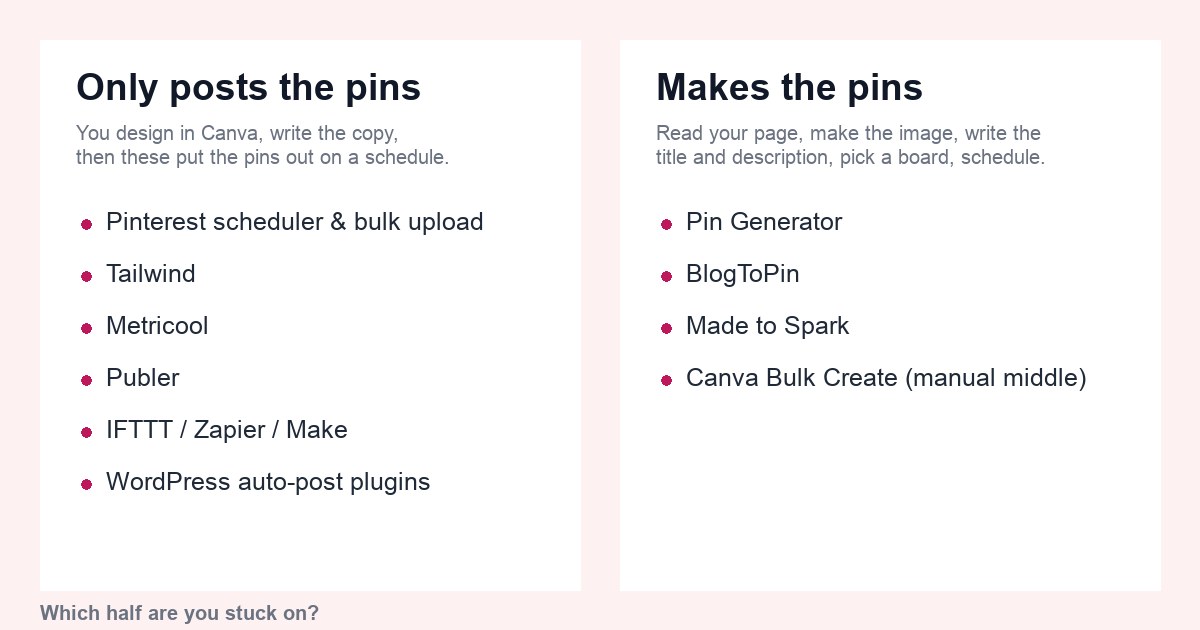
Group 1: tools that only post
You design every pin elsewhere, usually Canva, and write the copy yourself. These tools put the pins out on a schedule and show you stats.
Pinterest's own scheduler and bulk upload
Built in, nothing to pay, uses no third party. The scheduler holds 10 waiting pins, up to 30 days ahead, one pin at a time (as of October 2026). The bulk upload takes a 200-row spreadsheet from Settings → Import content (see how to post multiple pins at once). Start here if you make fewer than ten pins a week.
Leaves for you: everything except the posting.
Tailwind
The long-standing Pinterest scheduler, an approved API partner, with interval pinning, a SmartSchedule and analytics. It now sells pin creation and copy tools too (Create, Ghostwriter). Tailwind has moved to credit-based plans: scheduling a pin uses 1 credit, and SmartPin and keyword searches draw from the same credits, so check what a month of pins actually costs before you compare. See Made to Spark vs Tailwind for a side-by-side.
Leaves for you: the designs, unless you use its creation tools, which are template-based.
Metricool and Publer
Multi-network schedulers: Instagram, Facebook, LinkedIn, TikTok and Pinterest in one calendar, with analytics across all of them. Good if Pinterest is one channel of five. Neither makes Pinterest pins; you upload finished images. Comparisons: Metricool, Publer.
Leaves for you: designs and copy.
IFTTT, Zapier, Make
Recipes rather than schedulers: "new blog post → create a pin". They pin your featured image with your post title, one pin per post, through the Pinterest connection. Useful plumbing.
Leaves for you: a second pin, a better title, a vertical image.
WordPress auto-post plugins
Pinterest Automatic, SNAP, FS Poster and similar: pin the featured image on Publish. Same strengths and limits as the recipes, installed on your site. WordPress to Pinterest auto post compares them properly.
Group 2: tools that make the pins
These read your page and produce the image, the title and the description. They differ in how much you still do.
Pin Generator
AI and template pin maker with trend tools, a Chrome extension and plugins for WordPress and Shopify. Template-driven: you pick and adjust layouts. Scheduling is built in; check how it's metered on the plan you pick. Compared with Made to Spark.
Leaves for you: picking and tweaking templates per pin.
BlogToPin
Connects to a site or feed, generates pin images and copy, and queues the pins over days. Built around the same idea as Made to Spark's bulk pins; check its own site for how templates and boards work. Worth trying side by side if you're choosing.
Leaves for you: review, and template setup.
Made to Spark
Ours. Paste a link, or connect WordPress or Shopify, or paste an Etsy shop, tick the pages you want, and get up to four different pins per page made from its photos (or AI visuals if a page has no photo), with title, description, alt text and a board from your account. Approve the batch and it's scheduled over 30 days through the official API. For a single page with few or no photos, such as a quiz or a comparison page, you can get a Designed pin: a fun pin drawn whole by AI, with every word lettered in and checked, for 1 credit. Template pins and scheduling are included on subscriptions (up to 300–1,200 template pins a month, by plan); AI pins use credits. Bulk is on Solo and up. See bulk pins and pricing.
Leaves for you: approving the drafts. Doesn't do: video pins, Instagram or TikTok, client reporting.
Made to Spark in ChatGPT and Claude
The same tool, from a chat. Connect it to ChatGPT or Claude and ask in plain words: make pins from a link, make pins for all your posts on a topic, schedule them, give chosen posts a fresh pin every week, or check your Pinterest profile. See how it works.
Canva Bulk Create
The manual route: one template, a spreadsheet of titles and images, many pins. You still write every row and export, then schedule elsewhere.
The table
| Tool | Makes the image | Writes the copy | Picks the board | Schedules | Whole site at once |
|---|---|---|---|---|---|
| Pinterest scheduler / bulk upload | No | No | No | Yes | CSV, 200 rows |
| Tailwind | Templates | Ghostwriter | You | Yes, check credits | No |
| Metricool / Publer | No | No | You | Yes | No |
| IFTTT / Zapier / Make | Featured image | Post title | Fixed | On publish | No |
| WordPress plugins | Featured image | Post title | Fixed | On publish | No |
| Pin Generator | Templates / AI | Yes | You | Yes, check metering | Some |
| BlogToPin | Yes | Yes | Check | Yes | Yes |
| Made to Spark | Yes | Yes | Suggested | Yes, included | Yes, up to 500 pages (300 pins a month on Solo, 750 on Growth) |
| Canva Bulk Create | One template | You | No | No | Spreadsheet |
Features change often. Check each tool's own page before you decide; this table is right as of October 2026, when it was written.
What our pin data says about the two groups
The table is about features. Our 3,700-pin study says which features show up in clicks:
- Several pins per post. Posts with one top pin had a median of 0 outbound clicks; three different pins, 7; five or more, 16.5. Posts with two or more pins were 27% of the posts and brought 74% of the clicks. The recipes and plugins in group 1 make one pin per post, by design.
- The back catalog. Six in ten 2026 clicks came from pins first posted in 2025 or earlier. A tool that only reacts to new posts leaves the pages that already earn clicks alone.
- Copy and hashtags. Descriptions of 250 to 499 characters had the best click rate, 1.35%, against 0.28% under 100 characters. Pins with ten or more hashtags had a median of 14 views and a 0.16% click rate; pins with none, 154 views and 0.98%. If a tool's copy writer stuffs hashtags, delete them.
The trade-off runs the other way too. Group 1 tools leave every design decision with you, which is right if your pins are already your brand's best work. Group 2 tools trade some of that control for volume: you get layouts and wording you didn't choose, and the job becomes reading drafts and rejecting the weak ones. These are medians from top pins of 46 accounts, and correlation, not cause.
What 150 pins a month costs
Five pins a day is 150 a month, so that's the basis. Prices are from each tool's pricing page in October 2026 and will drift; use them to compare.
| Tool | Plan | Cost of 150 pins a month | What you still make yourself |
|---|---|---|---|
| Pinterest scheduler / bulk upload | Business account | Nothing | Every pin and every description |
| Tailwind | Pin Scheduling & Creation, 300 credits | $17.99/mo on annual billing, $29.99 monthly. Scheduling a pin uses 1 credit; extra credits $10 per 100. | The designs |
| Metricool | Starter | From $20/mo on annual billing, $25 monthly | Every pin and every description |
| Publer | Professional, per social account | $5 a month per social account ($4 billed yearly) | Every pin and every description |
| BlogToPin | Starter, 35 pins a day, 200 AI credits | $25/mo billed yearly ($299/yr) | Review |
| Pin Generator | Pro, 1,000 credits | $29.99/mo. A scheduled pin is 1 credit, an AI image 12 or 24, so 150 template pins fit easily and 150 AI pins don't. | Template choice per pin |
| IFTTT / Zapier / Make | Paid tiers for task limits | Depends on your other automations | A second pin, a better title |
| Made to Spark | Solo and up for bulk | See pricing. Template pins (up to 300–1,200 a month, by plan) and scheduling are included; AI pins use credits. | Approving the drafts |
How to choose
- Under 10 pins a week, happy in Canva: Pinterest's own scheduler. No tool needed yet.
- Pinterest is one of five networks: Metricool or Publer, and make the pins in batches.
- A blog or shop with a back catalog nobody has pinned: a tool from group 2. Run the same 20 posts through two of them and compare the pins.
- Whatever you pick: official API only, drafts you approve, a daily cap, never the same image twice. Pinterest automation: what's safe explains why.
- Choosing by what you have: see the best tools to turn blog posts into pins and the best Pinterest scheduler for bloggers.
Questions people ask
What is the best Pinterest automation tool?
The one that solves the half you're stuck on. If you already make plenty of pins, Pinterest's own scheduler or Metricool is enough. If you don't, you need a tool that makes the pins from your pages: BlogToPin, Pin Generator or Made to Spark. Run the same 20 pages through two of them and compare.
Can I automate Pinterest without paying for a tool?
Yes, up to a point. Pinterest's scheduler holds 10 pins up to 30 days ahead, and its bulk upload takes a 200-row spreadsheet. You still make every image and write every description yourself.
Is Tailwind still worth it in 2026?
For scheduling and analytics it's solid and approved by Pinterest. Check the credit math first: scheduling a pin uses 1 credit, so 150 pins a month is half the 300 credits on its scheduling plan before SmartPin or keyword searches.
Which Pinterest tools use the official API?
Pinterest's own tools, Tailwind, Metricool, Publer, BlogToPin, Pin Generator and Made to Spark all publish through the official API. Browser bots and scripts that ask for your Pinterest password do not.
Before you pay for anything
- Decide which you're short of: pins, or time to post them.
- Tool connects through Pinterest's official login.
- Scheduling cost known: included, or per pin.
- Several pins per page, not one featured image.
- You see the pins before they go out.
- Trial it on 20 real pages before paying for a year.