Best Pinterest Pin Makers in 2026, Sorted by What You Still Do
 Paul
Read in: English Español Français Deutsch
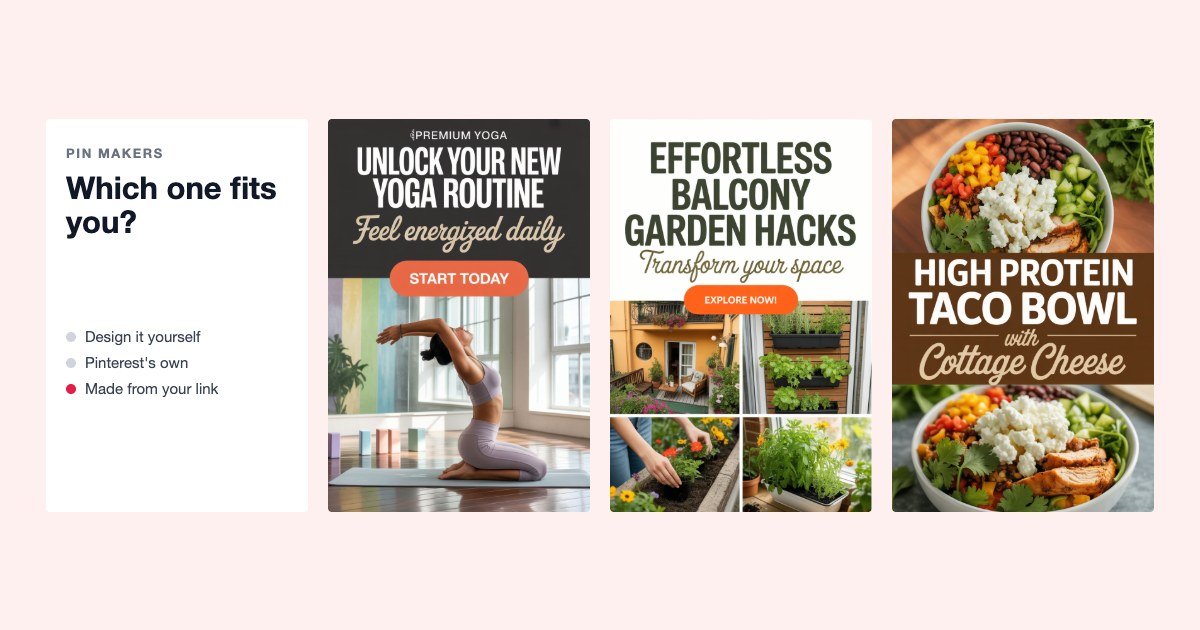
The best Pinterest pin maker depends on one question: do you want to design pins, or do you want pins? If you enjoy designing, Canva is still the tool to beat. If you have a blog or a shop and want finished pins without opening a design tool, pick one that makes pins from a link: Made to Spark, Pin Generator, BlogToPin, PinBuilds, PinsMachine or URL2Pin. Try two of them on the same page before you pay.
We make one of these tools, Made to Spark, so read this with that in mind. Every fact about the others comes from their own pricing and help pages, last checked on October 22, 2026. We re-check this list every three months.
Do this now (10 minutes)
- Count the pages you want pins for: blog posts, products or listings.
- Time yourself making one pin the way you do now, from opening the tool to a saved 1000 × 1500 image with a title and description.
- Multiply. If the answer is more than five hours, you want a tool that makes pins from a link, not a better design tool.
- Paste the same page into two of the link tools below and put the pins side by side before paying for either.
How we compared them
We checked each tool's own site and asked the same four questions of every one. Use them on any tool that isn't on this list:
- Where does the picture come from? You, your page's own photos, stock photos, or an AI drawing.
- Who writes the Pinterest title and description? Pins without a title are seen far less: in about 3,700 top pins from 46 accounts we looked at, pins with no title had a median of 46 views against 120 for titles of 41 to 70 characters.
- How does it count? A plan, credits per pin, or a monthly pin cap. Credits hide the real cost when AI images cost more than template pins.
- Do you see every pin before it posts, and does it post through Pinterest's official login?
We didn't buy every plan. Where a tool's own pages don't say something, the table says "not stated" rather than guessing. Full tables and method: Pinterest pin data 2026.
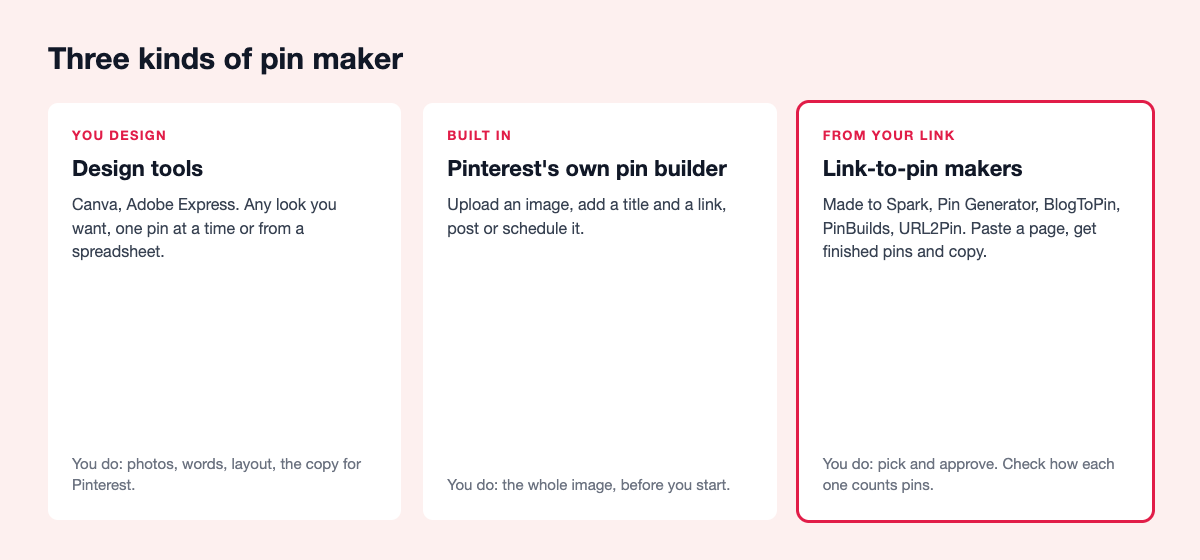
Design tools: you make every pin
Canva
Thousands of Pinterest templates, your brand colors and fonts saved, and Bulk Create, which turns a spreadsheet into one design per row. Canva can also schedule a design to Pinterest from its Content Planner.
Best for: people who like designing and want full control of the look. Watch out: Bulk Create needs a paid plan and the desktop app, and you still choose every photo and write every pin title and description. See Made to Spark vs Canva.
Adobe Express
Pinterest templates and a Content Scheduler that posts to Pinterest.
Best for: people who already pay for Adobe. Watch out: same as Canva, every design and every word is yours.
Tailwind Create
Tailwind's design tool makes many pin designs at once from images you upload, and Ghostwriter drafts titles and descriptions. It sits inside the best-known Pinterest scheduler, so making and posting happen in one place.
Best for: people who already schedule with Tailwind. Watch out: scheduling a pin uses one Tailwind credit, so count your monthly pins against your plan. Made to Spark vs Tailwind.
AI image makers
Tools like Ideogram draw an image with words in it from a sentence you type. Handy for one striking graphic.
Watch out: they don't read your page, write the Pinterest copy or post. And Pinterest may label pins it thinks were made with AI.
Pinterest's own pin builder
Upload an image, add a title, description and link, and post it or schedule it up to 30 days ahead, with up to 10 pins waiting. No other account needed, nothing to pay.
Best for: posting pins you made somewhere else. Watch out: it doesn't design anything.
Link-to-pin makers: paste a page, get pins
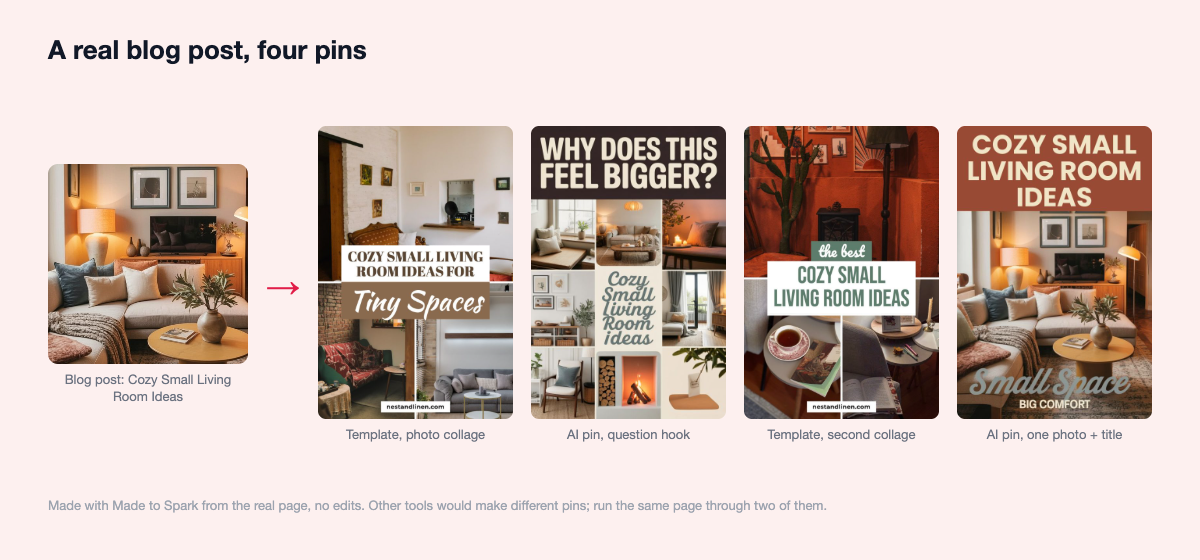
These read your page and give you finished pins with the Pinterest copy written. They differ in where the picture comes from, how they count, and how much you check before anything goes live. Here is what one of them makes from one page, so you know what to expect from the whole group:
Made to Spark
Ours. Paste a blog post, product page or Etsy listing and get several pins in designer templates made from the page's own photos, with title, description, alt text and a board suggestion. If a page has few or no photos, such as a quiz, a comparison page or a short landing page, you get a Designed pin: a fun pin drawn whole by AI in one of 6 looks, with every word lettered in and checked, for 1 credit. On Solo and Growth you can do a whole site at once, up to four different pins per page spread over 30 days, posted through Pinterest's official API. You approve every pin you make; Auto Pin can ask you first or run on its own. It also works inside ChatGPT and Claude: make and schedule pins by chatting.
Best for: blogs and shops with good photos and more pages than time. How it counts: a plan; template pins don't use credits (up to 300–1,200 a month, by plan), AI pins, Designed pins and AI edits do. A 7-day trial needs no card. Doesn't do: video pins, Instagram or TikTok, team logins. See pricing.
Pin Generator
Template and AI pins from any link or sitemap, AI titles and descriptions, scheduling, and imports from Etsy, Shopify and WooCommerce. You can preview pins without a card.
Best for: people who want many inputs and don't mind managing credits. Watch out: one credit to schedule or download a pin, half a credit for AI text and 12 to 24 for an AI image, so one AI pin can cost 13 to 25 times a template pin. Compared with Made to Spark.
BlogToPin
Reads the pages you give it, makes pins from your own photos, collages, stock or AI images, writes the copy, picks boards and schedules. You can edit pins before they're scheduled. It also takes Etsy links.
Best for: pinning a list of pages in one go. Watch out: every plan has a daily pin cap and a monthly AI credit allowance, and making pins for new posts on its own is only on the top plan.
PinBuilds
Takes a sitemap or product link and makes images, infographics, titles and descriptions, with a review queue and a guard against posting the same page too often. Posts through Pinterest's official API and has WordPress automation.
Best for: infographic-style pins for how-to posts. Watch out: sold by pins a month, with a 7-day trial; its site doesn't say whether it uses your own photos.
PinsMachine
Paste blog or product links in batches, or start from a title or your own image. Makes AI images or puts text on your photos, writes titles and descriptions, and posts to your boards or hands you a spreadsheet for Pinterest's bulk upload.
Best for: people who want a spreadsheet out, without giving a tool access to their account. Watch out: one credit for a standard pin, three for a product or AI pin.
URL2Pin
Built around product links from Amazon, Etsy and Shopify, plus blog posts. Makes AI images and copy, has an Autopilot mode, and can host a product page for affiliate links.
Best for: affiliate product pins. Watch out: AI images of a product may not match the real thing, and bulk links start on its higher plans.
What users say
We read the public reviews on Trustpilot, G2, the Shopify App Store, Product Hunt and Reddit in October 2026. Most link-to-pin tools are too new to have many, so this is thin on purpose.
- Tailwind: praised for how much time SmartSchedule and batch scheduling save, and on Reddit as the deepest Pinterest-specific tool. The most repeated complaints on Trustpilot are about yearly renewals charged without warning, and some users find its auto-made designs weak.
- Pin Generator: 4.6 from 29 reviews on the Shopify App Store, praised for scheduling months of pins fast and a responsive founder; complaints mention glitches after updates. One WordPress.org review reports a Pinterest suspension after ramping up to 10 to 12 pins a day, a reminder to pace any tool.
- Canva: Bulk Create is called a game-changer in G2 reviews; bloggers' complaints are that scheduling needs a paid plan and there's no bulk scheduling.
- BlogToPin, PinBuilds, PinsMachine, URL2Pin and Made to Spark: too few independent reviews to sum up. We don't have third-party reviews yet either; judge us by what the trial makes from your own page.
The table
| Tool | Picture from | Writes the copy | Many pages at once | You approve first | How it counts |
|---|---|---|---|---|---|
| Canva | You | No | Spreadsheet, paid plans | Yes, you post | Plan |
| Adobe Express | You | No | No | Yes, you post | Plan |
| Tailwind Create | Your uploads | Ghostwriter | Many designs at once | Yes | Credits |
| Pinterest pin builder | You | You | Spreadsheet upload | Yes | Nothing to pay |
| Made to Spark | Page photos, or AI | Yes | Whole site, Solo and Growth | Yes, or let Auto Pin run | Plan; credits for AI only |
| Pin Generator | Templates or AI | Yes | Sitemap | Approvals page | Credits |
| BlogToPin | Your photos, collages, AI | Yes | List of pages | Edit before scheduling | Daily cap + AI credits |
| PinBuilds | Not stated; infographics | Yes | Sitemap | Review queue | Pins a month |
| PinsMachine | Your photos or AI | Yes | Batches of links | Not stated | Credits |
| URL2Pin | AI | Yes | Higher plans | Not stated | Pins a month |
Checked on each tool's own pages in October 2026. Features change; check before you decide.
What the top pins tell us
In about 3,700 top pins from 46 accounts (February to October 2026; the sample favors winners), the number of different pins a page had went hand in hand with clicks. Pages with one top pin had a median of 0 outbound clicks. Two pins: 4. Three: 7. Four: 10.5. Five or more: 16.5. Pages with two or more different pins were 27% of the pages and brought 74% of the clicks.
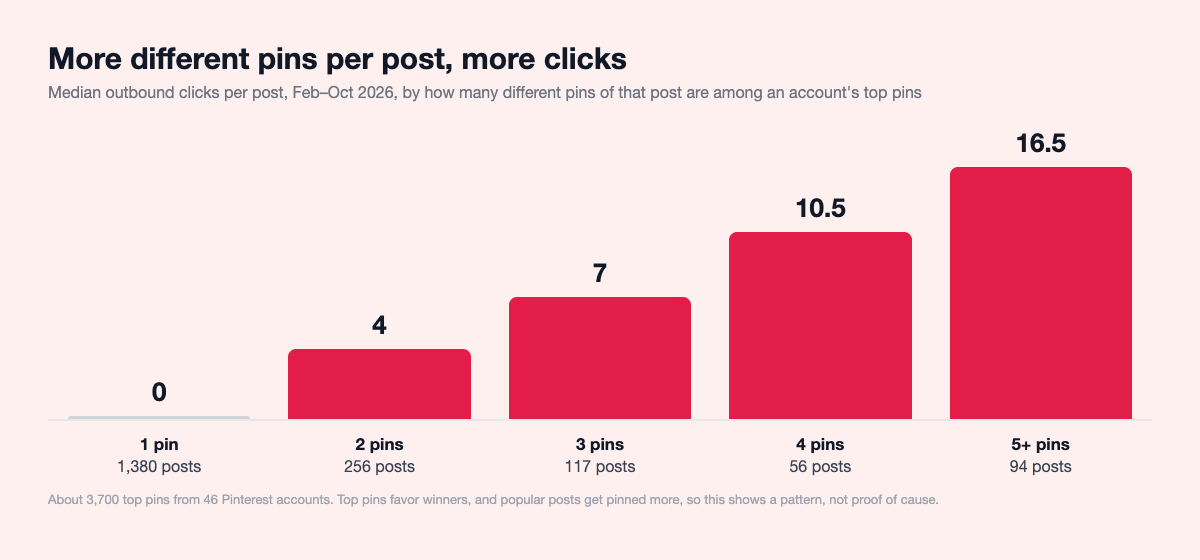
Popular pages get pinned more, so this is a pattern, not proof of cause. But the lesson for choosing a tool holds: pick one that makes several different pins per page, not one.
What a pin costs, and when you don't need to pay
The honest part first: if you post a handful of pins a week and enjoy designing them, you don't need a paid pin maker. Pinterest's own pin builder costs nothing and holds 10 scheduled pins, and any design tool you already have will make the image. What you pay with is time: the minutes you counted in step 2 above, for every pin, plus writing every title and description yourself.
A paid tool starts to make sense when that math goes past a few hours a month, or when you want three or four different pins per page, which is where the clicks were in the numbers above. To compare tools fairly, divide a plan's monthly price by the pins you'd really post, not by the biggest number on the pricing page. For ours: Made to Spark's Lite plan posts up to 5 pins a day, so about 150 a month; Solo adds Bulk Pins for up to 300 pins a month, and Growth 750, which brings the cost per pin down on the bigger plans. Template pins from your own photos use no credits; an AI pin or a Designed pin uses 1 credit, an infographic pin 2. Check the pricing page above for this month's prices.
What you give up with any link tool, ours included: the pin is built on the tool's designs, not drawn by you from scratch. If a hand-made look is part of your brand, keep designing, and use a tool only for the words and the posting.
Which one to pick
- You like designing, and post a few pins a week: Canva, then Pinterest's own scheduler.
- A blog with dozens of posts nobody has pinned: a link tool that does a whole site at once. How to pin your blog archive walks through it.
- A shop or Etsy listings: a tool that keeps your real product photo. Buyers want to see what arrives.
- Affiliate product links: URL2Pin is built for those; Made to Spark and Pin Generator take them too.
- Thin pages, quizzes and comparison pages: a tool that draws the whole pin, words included, because there's no photo to build on. Made to Spark's Designed pins do this.
- A blog that only needs pins for new posts: Pinterest can post them itself from your RSS feed once your site is claimed.
Questions people ask
What is the best Pinterest pin maker?
Canva if you want to design each pin yourself. If you want finished pins from your blog posts or products, use a tool that makes pins from a link, such as Made to Spark, Pin Generator, BlogToPin or PinBuilds, and compare two of them on the same page before you pay.
What size should a Pinterest pin be?
Vertical, 2:3, so 1000 × 1500 pixels. Taller pins can be cut off in the feed, and square or wide images look small next to vertical ones.
Can I make Pinterest pins without Canva?
Yes. Pinterest's own pin builder posts any image you upload, and link-to-pin tools make the image for you from your page's photos and title, so you never open a design tool.
Are AI-made pins allowed on Pinterest?
Yes. Pinterest may add an "AI modified" label to pins it thinks were made with AI, and people can ask to see fewer of them in some categories. For products, a pin built from your real photo avoids the question.
How many pins should one page get?
Several, each with a different image and headline, posted days or weeks apart. In our sample of top pins, posts with several different pins brought three quarters of the clicks.
The checklist
- Decide: design pins yourself, or get finished pins.
- Ask the four questions: picture, words, counting, approval.
- Try two tools on the same page and compare.
- Several different pins per page, 1000 × 1500.
- Official Pinterest login only.
- You see every pin before it posts.