How to Post Multiple Pins at Once on Pinterest (Bulk Upload Guide)
 Paul
Paul
Read in: English Español Français Deutsch

Yes, you can post many pins at once on Pinterest. A business account can upload up to 200 pins from one spreadsheet, with a title, board, link and publish date for each. It's hidden in Settings.
This guide walks through it: the exact columns, the date rule that causes most failed uploads, and the errors you'll hit. Then the catch: a spreadsheet with 200 rows needs 200 images and 200 descriptions, and that's the job the upload tool doesn't do.
Do this now (15 minutes)
- Check you're on a business account. The import tool isn't offered on personal ones.
- On desktop, open Settings and find Import content. Download Pinterest's sample spreadsheet from there.
- Put your pin images somewhere with a public link that ends in .jpg or .png. Your own website's media library works. Google Drive and Dropbox share links usually don't: they open a page, not the file.
Where the bulk upload lives
- Log in to your business account on a computer. Bulk upload is desktop only.
- Click the arrow at the top right to open your menu, then Settings.
- Choose Import content in the left-hand menu.
- Next to Upload .csv or .txt file, click Upload.
Start from Pinterest's own sample file and keep its column headers exactly as they are. Renaming a column gets rows skipped or the upload refused. The columns below are from Pinterest's help page as of October 2026; always start from the file you download.
If you'd rather start from a filled-in example, download our template CSV: the eight columns, three example rows for one blog post, dates already in the right format and a week apart. Replace the example text, keep the headers.
The columns
| Column | Required? | Rules |
|---|---|---|
| Title | Yes | Up to 100 characters. Put the searched phrase in the first 40. |
| Media URL | Yes | A public link to the image file itself, ending in .jpg or .png (or .mp4 for video). Not a link to a page that contains the image. |
| Pinterest board | Yes | The board name exactly as it appears on your profile, including capitals. |
| Thumbnail | Video only | Leave blank for images. |
| Description | No, but write one | Up to 500 characters. In our data, pins with a description of 250 to 499 characters had more than six times the click rate of pins with under 100. |
| Link | No, but always | The exact page the pin should send people to. |
| Publish date | No | See below. This is the one that goes wrong. |
| Keywords | No | Interest tags for the pin. |
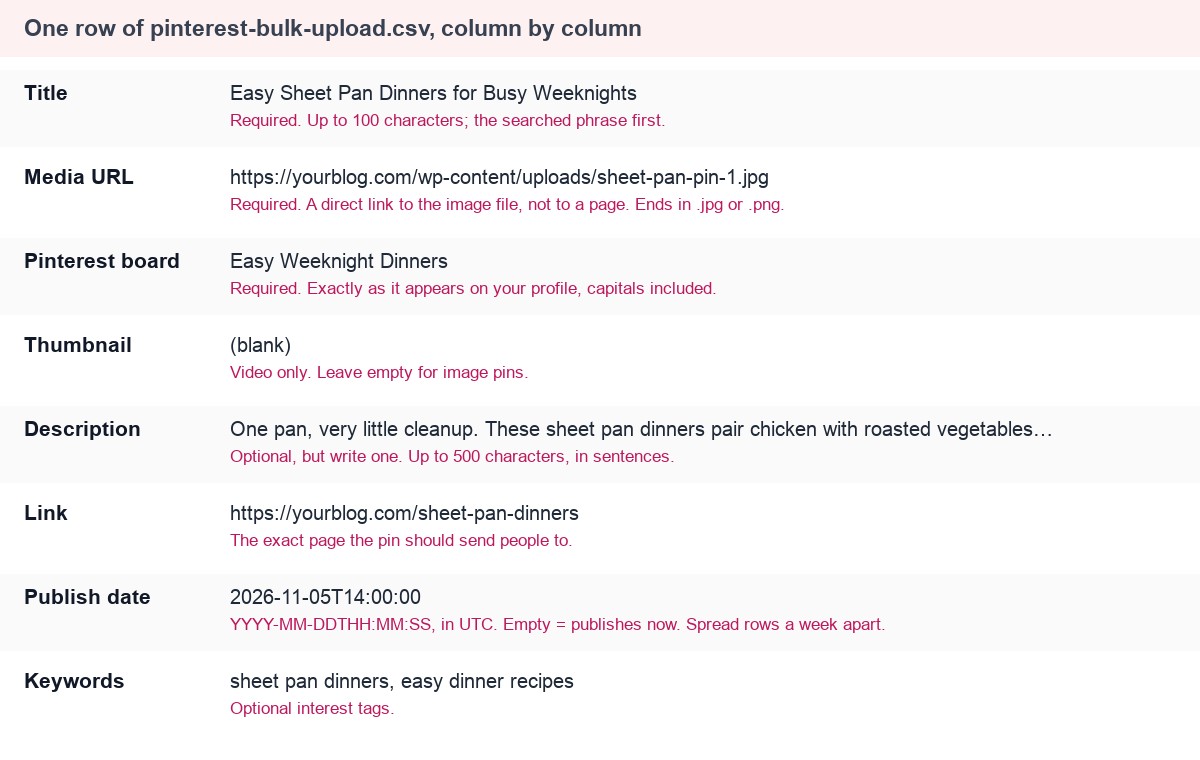
Here is one finished row, column by column, with the rule for each field:
The publish date rule
Pinterest accepts two formats: a date on its own, 2026-11-05, or a date with a time, 2026-11-05T08:00:00. The time is UTC, not your local time, so a pin set for 08:00 goes out at 3am in New York and 9am in Paris.
- Future date: the pin is scheduled for then.
- Date without a time: it publishes at the time of day you uploaded the file.
- Empty: it publishes straight away.
- Any other format (05/11/2026, "Nov 5", a spreadsheet's auto-formatted date): an error, and the pin doesn't publish.
That last one is the usual culprit. Excel and Google Sheets love to "help" by reformatting dates. Make the column plain text before you type the dates, and reopen the exported CSV to check they survived.
Spread the dates
Two hundred pins with an empty date column publish in one go. That's the burst Pinterest's spam filter is built to notice, and it leaves you nothing for next week. Give each row a date and spread the file across a month or more: two to five a day, the same page never twice in the same week. How often to post on Pinterest covers the pace.
Errors you'll hit, and the fix
| What happens | Why | Fix |
|---|---|---|
| Rows skipped with a media error | The Media URL points to a page, a share link, or a file behind a login | Use a direct link to the file. Open it in a private window: you should see only the image. |
| "Board not found" | Spelling or capitals don't match the board name | Copy the name from your profile. |
| Pins went out at the wrong hour | Times are UTC | Convert from your time zone before you fill the column. |
| Date errors on every row | The spreadsheet reformatted the dates | Set the column to plain text and use YYYY-MM-DD. |
| Upload refused | Over 200 rows, or a renamed header | Split the file; restore the sample headers. |
| Everything published at once | Empty date column | Fill every row with a future date. |
Other ways to post several pins at once
- The desktop pin builder lets you drop several images at once and starts a draft for each. You still fill in every title, description, link and board by hand, one draft at a time.
- Pinterest's own scheduler holds 10 waiting pins, up to 30 days ahead, one pin at a time. Fine for a week; not for a month.
- Third-party schedulers (ours included) that use the official API have no queue of ten. You approve a batch and it goes out over weeks.
The catch: 200 rows is 200 pins to make
The import tool posts pins. It doesn't make them. Before you can fill the spreadsheet you need, for each row, a vertical image, a title under 100 characters, a description, and a board that fits. For 200 rows at ten minutes each, that's a working week.
This is the step Made to Spark does. Paste your site address, tick the posts or products you want, and it makes up to four different pins for each from the photos on the page, writes the title, description and alt text, and matches a board from your Pinterest account. Then either:
- Schedule through the API. Approve the batch and it's spread over the next 30 days under a daily cap. No spreadsheet at all.
- Export a CSV. The scheduler has a CSV mode: plan the dates on the calendar, export, and upload the file to Pinterest yourself.
Questions people ask
How many pins can I upload at once on Pinterest?
Up to 200 per file with a business account, through Settings → Import content on a computer. Split a bigger batch into several files.
Can I bulk upload pins from my phone?
No. Pinterest's import tool is desktop only. The phone app lets you make one pin at a time.
Can I schedule pins in a bulk upload?
Yes. Fill the Publish date column with a future date, as 2026-11-05 or 2026-11-05T08:00:00 in UTC. Leave it empty and the pin publishes at once.
Why did my Pinterest bulk upload fail?
Almost always one of three things: a date in the wrong format (spreadsheets reformat them), a Media URL that opens a page instead of the image file, or a board name that doesn't match your profile exactly.
Before you upload
- Business account, desktop, Settings → Import content.
- Pinterest's sample file, headers untouched.
- Media URLs that end in the file name and open in a private window.
- Board names copied exactly.
- Dates as YYYY-MM-DD or YYYY-MM-DDTHH:MM:SS, in UTC, column set to plain text.
- Every row dated, spread over a month, same page never twice in a week.
- Under 200 rows per file.
- Images, titles and descriptions made in a batch before you open the spreadsheet.