Shopify to Pinterest: A Pin for Every Product, Automatically
 Paul
Read in: English Español Français Deutsch
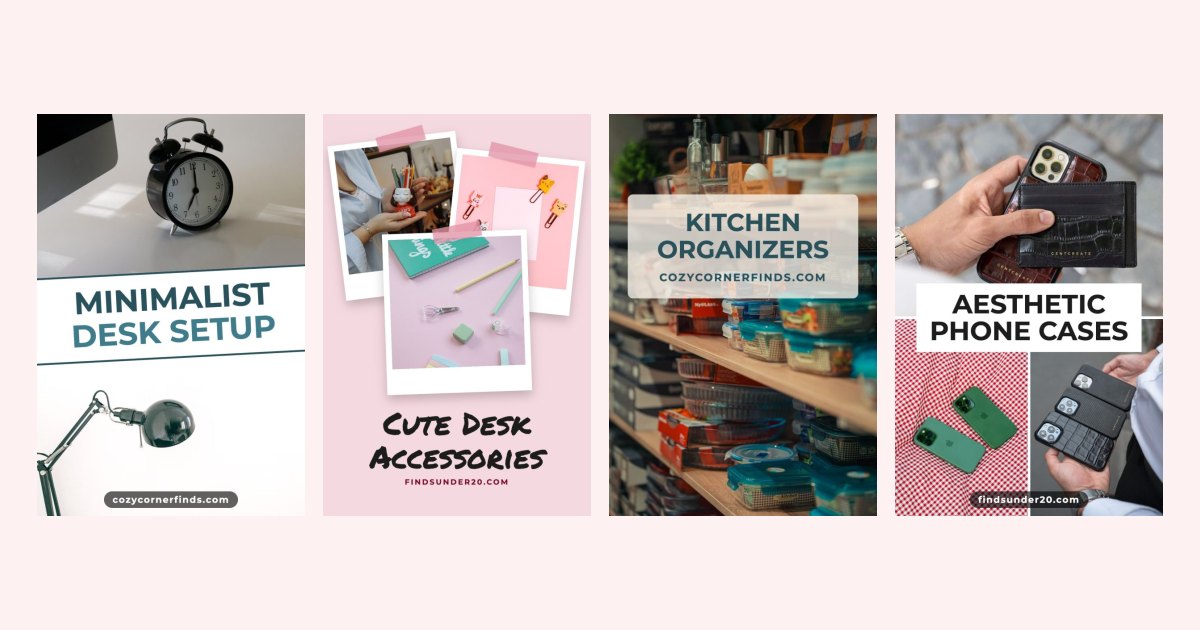
If you run a Shopify store, install the Pinterest app. It syncs your catalog so every product becomes a product pin with a live price, and it adds the Pinterest tag for tracking. That's the floor.
It's also where most stores stop, and the catalog pins are plain: the product photo, the product name, one per catalog item, no text, nothing written. They sit in the shopping tab and wait to be found. The pins that get found are designed, titled for search, and made several per product.
Do this now (15 minutes)
- Install Pinterest's Shopify app if you haven't, connect your business account, and let the catalog sync.
- Run one product URL through the Rich Pins validator to confirm your theme's product details read correctly, so pins that link to your pages show price and availability.
- List your ten best sellers. They get designed pins first.
What the Pinterest app for Shopify does, and doesn't
Does: publishes product pins from your catalog, keeps price and stock in sync, adds the Pinterest tag, lets you run ads from the catalog.
Doesn't: design anything, write anything, or pick boards. And because the feed sends each variant as its own item, a t-shirt in six colors and four sizes can turn into a lot of near-identical pins. Variants are grouped in the pin close-up these days, which helps, but it's still one plain image per product.
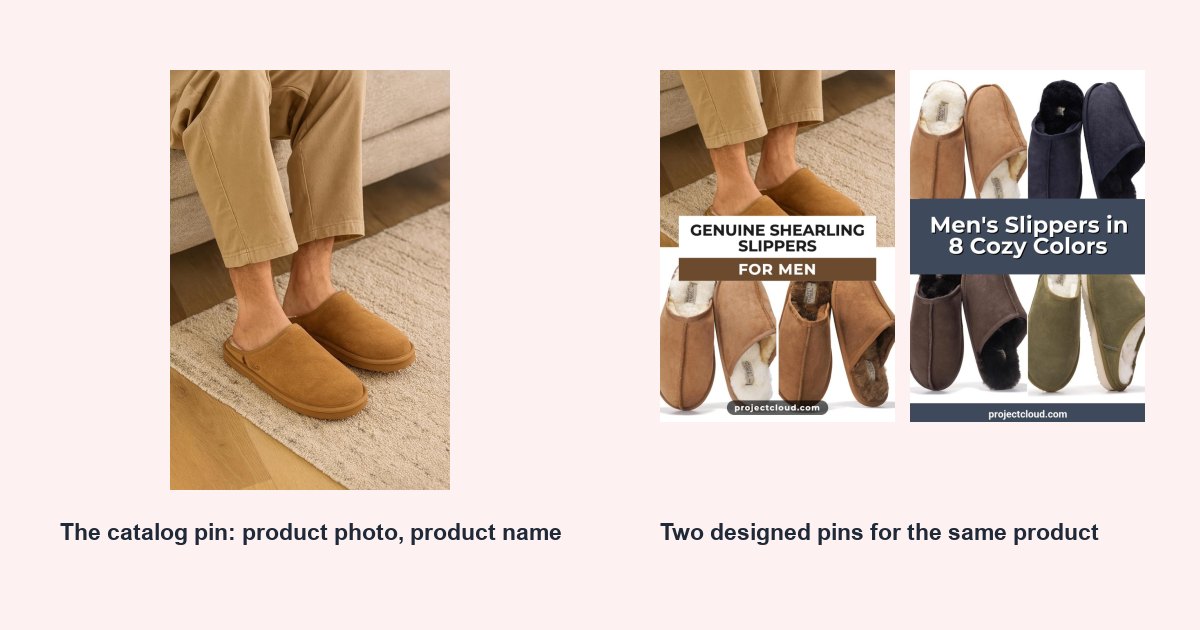
Keep it running. Then add the second layer.
Option 1: Zapier or Make, new product → pin
A recipe watches for a new Shopify product and creates a pin with one image, the product name and the link. Nothing to design, nothing installed.
The limits are the same as every "on publish" recipe: one plain product photo, the product name as the title, one fixed board, nothing for products you already have. A safety net for new products.
Option 2: pins designed from your product pages
In Made to Spark, on a plan, you connect your Shopify store or paste product links. You tick the products you want, up to 500 in a batch, and for each one you get up to four different pins made from the product photos, in vertical layouts with text, in your brand colors, with a store banner if you want it. Each pin comes with a title written for how shoppers search, a description, alt text, and a suggested board from your Pinterest account.
Approve the batch and it's scheduled over the next 30 days through the official Pinterest API, with pins for the same product kept a week apart. Nothing publishes until you approve it. The Shopify page has real examples.
Use both layers: the catalog pins carry the price and feed the shopping tab; the designed pins carry the idea ("cozy slippers for cold floors") and bring people in from search.
What a product pin should say
The product name is not a pin title. "Men's Shearling Slipper – Tan – Size 10" is a catalog entry. Pin titles name the use or the person:
- The search: "Warm house slippers for men"
- The gift: "Cozy gift ideas for dads who hate cold floors"
- The feature: "Slippers with a sole you can take outside"
- The scene: "Winter cabin weekend essentials"
One product, four ways in.
What shop pins look like, and what a catalog costs to cover
We haven't sampled Shopify stores separately, but we did look at 156 real pins that link to Etsy listings, the closest thing to a store's own product pins. 76% had no text on the image, 31% were the plain listing photo, and none showed a price. That's what most catalog pins look like too, so a product pin that names its use on the image stands out among them.
How many pins per product? In our study of 3,700 pins, pages with a single top pin had a median of 0 outbound clicks; three different pins, 7; four, 10.5. Pages with two or more pins were 27% of the pages and brought 74% of the clicks. Correlation, not cause, but one catalog pin per product is the low end of that table.
So the sum for a store with 100 products worth pinning, three designed pins each, is 300 pins:
- By hand, at ten minutes a pin for the design, title and description, about 50 hours.
- In Made to Spark, 300 pins is the monthly Bulk Pins amount on the Solo plan (see pricing), plus the time to read the drafts.
And they don't expire after launch week: six in ten 2026 clicks in the study came from pins first posted in 2025 or earlier.
Pace it, especially the catalog sync
In a review of the Pinterest app on the Shopify app store (February 2026), a merchant described an established Pinterest business account being deactivated for "spam" shortly after a catalog sync pushed many product updates in a short burst. The reviewer suggested syncing in smaller batches. It's one account's story, but it matches how spam filters work: a flood of similar items from one source in a short time.
- Let the first catalog sync finish before you start scheduling designed pins, and if you reorganize hundreds of products, do it in batches over a few days so the app doesn't re-send everything at once.
- Two to five designed pins a day, spread across the day, ramping up from one or two on a new account.
- Different layouts for the same product, a week apart. Product pins look alike, which is what a spam filter notices.
Pinterest automation: what's safe has the full set of rules.
The routine
- Month one: best sellers, four pins each. Then the rest of the catalog in batches, scheduled across the month.
- Weekly: tick the products added since last time. Ten minutes.
- Before each season: gift-angle pins for the products that fit, 60–90 days ahead.
- Monthly: look at outbound clicks per pin in Pinterest analytics. Products that pull clicks get more angles.
Questions people ask
Does the Pinterest app for Shopify create pins automatically?
It creates product pins from your catalog: the product photo, name and live price, one per catalog item. It doesn't design pins, write titles for search or pick boards. Use it for the shopping tab and add designed pins on top.
Why does Pinterest make a pin for every Shopify variant?
Because the Shopify feed sends each variant as its own catalog item. Pinterest now groups variants in the pin close-up, but the feed still carries each one.
How many pins a day should a Shopify store post?
Two to five designed pins a day, spread across the day, with the same product no more than once a week and a different layout each time. Ramp up from one or two on a new account.
Can I make Pinterest pins from Shopify product pages without the app?
Yes. Paste a product URL into a pin generator and it reads the photos and title from the page. On a plan, Made to Spark also connects to the store so you can tick products in bulk.
Before you schedule anything
- Pinterest app installed, catalog synced, tag on.
- Rich Pins valid on product pages.
- Best sellers first, four designed pins each.
- Titles that name the use, the person or the gift, not the SKU.
- Two to five a day, same product a week apart, different layouts.
- Weekly pass for new products.
- Seasonal gift pins two to three months early.